


References:
https://learn.microsoft.com/en-us/nuget/concepts/auditing-packages
NuGet Audit
Supply chain attacks are a growing concern in software development, and one way to mitigate this risk is leveraging tools like NuGet Audit.
By enabling this feature in your solution/project, you can be warned about relevant vulnerabilities, or even fail builds with known vulnerable dependencies.
Creating a new project with a vulnerable dependency
To demonstrate how NuGet Audit works, let’s create a new .NET project and add a vulnerable dependency.
We start by creating a new console application:
dotnet new console -n test-project
cd test-project
Let’s do a dotnet restore to see that everything looks fine:
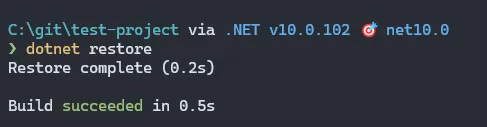
Now that we have a project, let’s add a vulnerable package:
dotnet add package Newtonsoft.Json --version 12.0.3If we run dotnet restore again, we can see that we get a warning about the vulnerable package:

Understanding NuGet Audit
Right, so we got a warning about the vulnerable Newtonsoft.Json package, so why do we NuGet Audit anyway?
With .NET 8.0.100 (NuGet version 6.8), NuGet Audit was introduced and enabled by default.
For instance, if we change the project SDK to 7.0.x and project to target .NET 7.0:
dotnet new globaljson --sdk-version 7.0.410<!-- test-project.csproj -->
<Project Sdk="Microsoft.NET.Sdk">
<PropertyGroup>
<OutputType>Exe</OutputType>
<TargetFramework>net7.0</TargetFramework>
<RootNamespace>test_project</RootNamespace>
<ImplicitUsings>enable</ImplicitUsings>
<Nullable>enable</Nullable>
</PropertyGroup>
<ItemGroup>
<PackageReference Include="Newtonsoft.Json" Version="12.0.3" />
</ItemGroup>
</Project>Running dotnet restore now will not give us any warnings anymore:
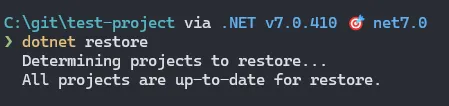
So, let’s delete the global.json file and set the target framework back to .NET 10.0, but additionally add <NuGetAudit>false</NuGetAudit> to the project file to disable NuGet Audit:
<!-- test-project.csproj -->
<Project Sdk="Microsoft.NET.Sdk">

  <PropertyGroup>
    <NuGetAudit>false</NuGetAudit>
    <OutputType>Exe</OutputType>
    <TargetFramework>net10.0</TargetFramework>
    <RootNamespace>test_project</RootNamespace>
    <ImplicitUsings>enable</ImplicitUsings>
    <Nullable>enable</Nullable>
  </PropertyGroup>

  <ItemGroup>
    <PackageReference Include="Newtonsoft.Json" Version="12.0.3" />
  </ItemGroup>

</Project>
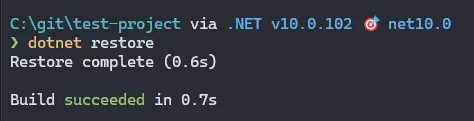
Running dotnet restore will not give us any warnings with .NET 10 and a vulnerable package:
Configuring NuGet Audit Level
Now that we’ve seen that NuGet Audit is something we can turn on and off, let’s have a look at what else we can configure.
We can start by changing the severity level by adding the NuGetAuditLevel property to the project file and setting this to Critical:
<!-- test-project.csproj -->
  <PropertyGroup>
    <NuGetAudit>true</NuGetAudit>
    <NuGetAuditLevel>critical</NuGetAuditLevel>
As we saw earlier, the Newtonsoft.Json package has a High severity vulnerability, so setting the level to Critical will suppress the warning:
The options for NuGetAuditLevel are: low, moderate, high, and critical.
Let’s set it to low to ensure we get all warnings:
<!-- test-project.csproj -->
  <PropertyGroup>
    <NuGetAudit>true</NuGetAudit>
    <NuGetAuditLevel>low</NuGetAuditLevel>
Configuring NuGet Audit Mode
Another configuration option is to change the <NuGetAuditMode>. This will allow us to define how deep we want to scan (direct or including transitive dependencies).
The options are direct and all. Let’s set the mode to direct:
<!-- test-project.csproj -->
  <PropertyGroup>
    <NuGetAudit>true</NuGetAudit>
    <NuGetAuditLevel>low</NuGetAuditLevel>
    <NuGetAuditMode>direct</NuGetAuditMode>
Let’s remove the Newtonsoft.Json package and add a package with a vulnerable transitive dependency:
dotnet remove package Newtonsoft.Json
dotnet add package Swashbuckle.AspNetCore.Swagger --version 1.0.0
Running dotnet restore and all is looking well and good… but that’s because we’re scanning only direct dependencies:
So if we change the mode to all:
<!-- test-project.csproj -->
  <PropertyGroup>
    <NuGetAudit>true</NuGetAudit>
    <NuGetAuditLevel>low</NuGetAuditLevel>
    <NuGetAuditMode>all</NuGetAuditMode>
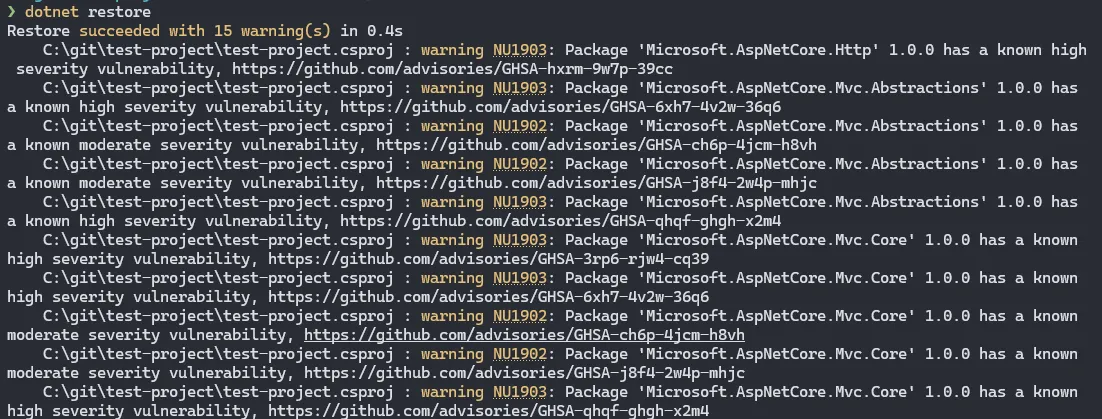
We will now get a lot of warnings:
Adding visibility to the build pipeline
A nice way to get visibility into the vulnerable dependencies in your project or solution, is to output the audit results as part of the build process.
For Azure DevOps pipelines, you can add the following task to your pipeline:
- script: dotnet restore ./YourSolutionFile.sln
  displayName: 'dotnet restore'
Failing the build when vulnerabilities are found
To ensure your pipeline does not publish vulnerable code, you can configure the build to fail when vulnerabilities are found.
We can do that by treating WarningsAsErrors. To ensure this is done for all the projects in a solution, you can add a Directory.Build.props file to the solution folder with the following content:
<Project>
  <PropertyGroup>
    <!-- Enable NuGet package auditing -->
    <NuGetAudit>true</NuGetAudit>
    <!-- Audit direct and transitive packages -->
    <NuGetAuditMode>all</NuGetAuditMode>
    <!-- Report low, moderate, high and critical advisories -->
    <NuGetAuditLevel>low</NuGetAuditLevel>
    <!-- Fails the build on CI or on release when a vulnerability is detected -->
    <WarningsAsErrors Condition="$(ContinuousIntegrationBuild) == 'true' OR '$(Configuration)' == 'Release'">
      $(WarningsAsErrors);NU1900;NU1901;NU1902;NU1903;NU1904
    </WarningsAsErrors>
  </PropertyGroup>
</Project>
The warning codes shown above are as follows (+ NU1905 to cover them all):
| Warning Code | Reason |
|---|---|
| NU1900 | Error communicating with package source, while getting vulnerability information |
| NU1901 | Package with low severity detected |
| NU1902 | Package with moderate severity detected |
| NU1903 | Package with high severity detected |
| NU1904 | Package with critical severity detected |
| NU1905 | An audit source does not provide a vulnerability database. |
Finding the root cause of a transitive vulnerability
As we saw earlier, when calling dotnet restore we get a list of vulnerable packages. However, it does not tell us which package is bringing in the vulnerable dependency.
For instance we can see that we have the vulnerable Microsoft.AspNetCore.Http package in our project:
Restore succeeded with 15 warning(s) in 0.4s
    C:\git\test-project\test-project.csproj : warning NU1903: Package 'Microsoft.AspNetCore.Http' 1.0.0 has a known high severity vulnerability, https://github.com/advisories/GHSA-hxrm-9w7p-39cc
To find out which package is bringing in the vulnerable dependency, we can use the dotnet nuget why command.
Let’s run it the following command, and specify the relevant project and package name:
dotnet nuget why .\test-project.csproj Microsoft.AspNetCore.Http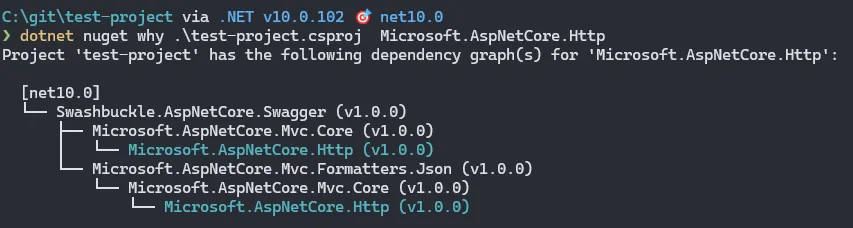
At the top of the tree we can see that Swashbuckle.AspNetCore.Swagger is bringing in Microsoft.AspNetCore.Http as a dependency via Microsoft.AspNetCore.Mvc.Core (twice), and thus is the root cause of the vulnerability.